Seven Tips to Protect Yourself Online with Better Passwords

Seven Tips to Protect Yourself Online with Better Passwords

Passwords are difficult to maintain, but they’re still one of the most important lines of defense protecting your personal and financial information. The key (pun intended) to preventing your accounts from being hacked, whether they’re your digital banking or social media accounts, is to use strong, unique passwords across all of your accounts. A recent People article reported that nearly 150 million email and social media accounts could be affected by ‘stolen passwords’. That includes platforms such as Gmail, Yahoo, Outlook, TikTok, Facebook, and many more.

The good news? Creating strong passwords doesn’t require advanced technical skills. With a few smart habits, you can dramatically reduce your risk of fraud, identity theft, and account takeovers. Below are seven proven best practices to help you create stronger passwords and remember them without frustration.


1. Use Long Passwords or Passphrases

Length matters more than complexity alone. A longer password is much harder to crack, even if it uses familiar words.
Best practice:
  • Aim for 12–16 characters or more.
  • Consider a passphrase made of several unrelated words.
    • Example: RiverSunsetCoffeeBike!
Passphrases are easier to remember and far more secure than short, complex-looking passwords.

2. Never Reuse Passwords Across Accounts

Reusing passwords is one of the biggest risks people take online. If one site is compromised, criminals often try the same credentials on other accounts, such as banking, email, and shopping.
Best practice:
  • Use a unique password for every important account, especially:
    • Online banking
    • Email
    • Payment apps
    • Retail and subscription services
Think of every password as a single-use key. One lock, one key.

3. Avoid Personal or Predictable Information

Cybercriminals don’t guess randomly—they use information from social media, public records, and data breaches.
Avoid using:
  • Names of family members or pets
  • Birthdays or anniversaries
  • Phone numbers or addresses
  • Common substitutions like P@ssw0rd
If someone could guess it or find it online, it doesn’t belong in your password.

4. Mix in Capital Letters and Symbols to Make Passwords Stronger

Once you have a long, unique password or passphrase, adding a mix of capital letters, numbers, and symbols makes it even harder for criminals to crack.
Best practice:
  • Capitalize letters in uncommon places (not just the first letter)
  • Add symbols like ! @ # $ % where they feel natural
  • Replace spaces in passphrases using symbols.
    • Example: River!Sunset#Coffee$Bike
Avoid predictable patterns like capitalizing only the first letter or adding “!” at the end every time. Small variations go a long way in strengthening your password.

5. Use a Password Manager (and Let It Do the Heavy Lifting)

Remembering dozens of strong, distinctive passwords is tough unless you use a password manager.
Best practice:
  • Use a reputable password manager to:
    • Generate strong passwords automatically.
    • Store them securely
    • Autofill logins safely
With a password manager, you only need to remember one strong master password, and the rest is handled for you.

6. Add Multi-Factor Authentication (MFA) Wherever Possible

Even the strongest password is safer with a second layer of protection.
Best practice:
  • Enable multi-factor authentication (MFA) on important accounts.
  • This may include:
    • A one-time code sent to your phone
    • A biometric login (fingerprint or face ID)
    • An authenticator app
MFA helps protect your account even if a password is compromised.

7. Change Passwords When There’s a Reason — Not Just a Notice

You don’t need to change passwords constantly, but you should act quickly if there’s a warning sign.
Change your password if:
  • A company reports a data breach.
  • You receive an alert that your credentials were exposed.
  • You notice suspicious account activity.
Quick action can prevent small concerns from becoming costly problems.

Final Thought: Strong Passwords Are All About Peace of Mind

Strong passwords aren’t about being perfect; they’re about being prepared. By using unique, long passwords and smart tools, you significantly reduce the chances of fraudsters gaining access to your accounts.
A few small changes today can help protect your money, your identity, and your peace of mind tomorrow.

Looking for more resources for preventing fraud and avoiding scams, check out our Fraud Prevention page.

Password Security Check: Alerts You if Your Password is Found on the Dark Web

Password Security Check

We’re excited to introduce Password Security Check, a new free service from The Callaway Bank that helps protect your Digital Banking.  It works by comparing your password against those exposed in known data breaches or on the dark web.  If the system finds a match, you’ll get an alert when you log into Digital Banking, encouraging you to change your password.

Why Is This Important?

Recent research shows that 94% of leaked passwords are either reused or weak, meaning the vast majority of online accounts are protected by shaky measures. That’s because only about 6% of exposed passwords were unique, leaving the rest dangerously predictable and reusable across multiple sites.1  Additionally, passwords that have been collected through countless breaches over the years are available on the dark web for hackers to access.  Why try to guess passwords when they can start with the most common ones?

How Does Password Security Check Work?

This new service, provided by The Callaway Bank, is free and will automatically run in the background for all of our Digital Banking clients.  The system compares your password against a constantly updated database of exposed passwords.  It’s important to understand that finding a match does NOT mean your account has been hacked. It does mean that your password matches those of other people whose passwords were compromised.  Hackers could, however, try to use it to access your accounts. This Password Check helps spot that risk before it becomes a problem.

What’s the Benefit To Me?

Our Password Security Check adds an extra layer of protection to your online banking—helping keep your account safe from fraud and unauthorized access.

Who at the Bank Can Access my Password?

Nobody within the Bank can see or access your password. Our banking system does not allow anyone to view your password.  But because the system knows your password, it can compare it to the database of other compromised passwords.

When Will Password Security Check Be Active?

February 24th will be when it goes live.

Want to Know More about Creating and Using Stronger Passwords?

When you manage your money and accounts online, the strength of your passwords matters more than ever. We’ve put together seven tips on how to make your passwords stronger and easier to manage.


Source:
1https://cybernews.com/security/password-leak-study-unveils-2025-trends-reused-and-lazy/

Financial Fraud Attempts Growing

Financial Fraud Attempts Growing

Data breaches, unfortuanately, have become a common occurance in this modern world.  High-severity breaches include sensitive data such as social security numbers and passwords. With so many of these instances, it is essential to review your statements and monitor your accounts regularly. 

At the Bank, we continue to see the number of attempts by fraudsters to gain access to client accounts grow. They use the information found on the dark web from the hundreds of data breaches to impersonate the customer on the phone. (This is why we go to such lengths to accurately identify you when you call into our Customer Care Team.) Or with that info, fraudsters can sometimes guess the client’s ID and password for online banking, which they will then use to transfer funds or send payments to fake businesses.

How can you best protect yourself from these scenarios?

  • Check your statements routinely and call the Bank if you see any irregularities.
  • Use long passwords with at least ten characters and a mix of alphanumeric characters (A, b, 1, 9) using upper and lower case and symbols (@, $, %, *).
  • Never use the same passwords on multiple sites.
  • Speak to a banker to set up a security challenge pass-phrase that must be shared before making any changes to account(s).
  • Never use your mother’s maiden name or other easily obtained information for passwords or security phrases. These can be found on genealogy sites or learned from your social media. 
  • Update the Bank with your current contact info, particularly your cell phone number.  This helps us contact you faster if we notice something odd with your account.
  • Those fun quizzes on social media about “have you ever” or trivia contests – don’t do it. Those are often collection points for hackers to gain extra info about you. 

 Other tips and resources for protecting against financial fraud are available here.
Fraud Protection Tips

If you ever notice something odd or feel your account may have been compromised, please always contact the Bank immediately. 

 Ashland: 573-657-0849  |  Columbia: 573-447-1771  |  Fulton: 573-642-3322  |  Mokane: 573-676-5711
Or Reach Any Locations Using:
 800-446-2265

A Guide to the Corporate Transparency Act for Missouri Business Owners

As a Missouri business owner, navigating the complexities of business regulations is challenging. Now, there’s a new law in effect that every owner needs to know about: the Corporate Transparency Act (CTA). While the thought of tackling another requirement may feel daunting, rest assured that The Callaway Bank’s Business Banking Team is here to guide you through the process.  

Helpful CTA Links for Missouri Business Owners

What Is the Corporate Transparency Act?  

Effective January 1, 2024, the CTA is designed to increase corporate accountability. The law introduces a critical requirement that many businesses must comply with — the Beneficial Owner Information Report (BOIR). The goal is to boost transparency in business operations to prevent fraud and illegal activities like money laundering. 

Review CTA Reporting Requirements  

A brunette Missouri Business Owner on the phone at his desk, smiling What Is the Beneficial Owner Information Report?  

As the key component of CTA, BOIR involves providing important details about the company’s beneficial owners. While the specifics vary based on the type of ownership, it typically includes names, addresses, and other identifying and trackable details. The report must be filed with the Financial Crimes Enforcement Network (FinCEN) by the specified submission date.  

View All BOIR Submission Deadlines

How Does It Impact Your Missouri Business?  

The CTA has far-reaching implications for a wide range of Missouri businesses. Understanding how it impacts your organization is crucial for ensuring compliance and avoiding potential legal and financial consequences. Here are a few key points:  

  • Who Must File: Most entities registered with the state are required to file a BOIR.  
  • Filing Deadlines: These vary based on when the business was officially established.   
  • Exemptions: There are exemptions, including 23 types of entities.  

For qualifying businesses, compliance is crucial. Failing to meet the CTA reporting requirements can result in legal and financial repercussions.   

Learn More About CTA Exemptions  

How Fraudsters Are Leveraging It  

With new regulations come new opportunities for fraudsters. There are reports of spammers exploiting the CTA by posing as regulatory bodies or legal entities to extract sensitive information from unknowing businesses. They might trick business owners using emails, phone calls, or fake websites. It’s vital to verify the legitimacy of any request for company information and be cautious of unsolicited communication related to the CTA.  


Contact The Business Banking Team

Fraudsters Target Even the Savvy: A Real-Life Account Reveals Deception

In a world where fraud can target anyone, even the most informed and discerning individuals can become victims of cunning schemes. The following incident from a Callaway Bank client is a stark reminder of this unsettling reality and the importance of fraud prevention.

How Fraudsters Target Locals in Boone & Callaway Counties

Mary Quartermont, Assistant Vice President and Deposit Operations Manager at The Callaway Bank, has seen many unfortunate instances of good people conned out of their life savings. She shares a true story of an intelligent individual who fell into the clutches of a fraudulent scheme orchestrated through social media.

This victim was a widower who had recently lost his spouse and encountered a fraudster on Facebook posing as an investment agent with an impressive reputation. The scammer recognized that the victim was likely lonely. Over several months, they deftly built a bond with the gentleman, using shared interests and friendly conversations to establish trust.

Fraud Prevention in Columbia, MO | Handsome mature man in casual suit sitting at the table in home office and thinking on his work, when looking at laptop screenAs the relationship grew, the fraudster skillfully persuaded the victim to invest funds under the pretense of lucrative opportunities. They even produced a fake account that showed they were making money for their clients. These con artists often create fake websites and social media personas to help convince their victims that everything they say is legitimate.

How Bankers Identify Potential Fraud

The scammer gave detailed instructions on wiring the funds to be invested. Knowing that the bank would ask about details of the wire, the victim was coached on what to say to help navigate the bank’s scrutiny and evade detection. “Tell them you’re helping a family member out, or it’s going to one of your kids, etc. That will steer the bank from suspicion of fraud,” the fraudster explained.

However, the keen-eyed team at The Callaway Bank detected inconsistencies in the transaction, prompting a thorough investigation. At first, the client was insistent that he knew this individual and that they would not scam him or cause him financial harm. Despite initial reluctance from the targeted gentlemen, the evidence revealed the scheme’s true nature. The victim had unwittingly fallen for a clever ploy, capitalizing on their emotional vulnerability and desire for a good investment.

It is vital to understand that falling prey to such deceit does not reflect the victim’s shortcomings. These con artists employ sophisticated tactics that can ensnare individuals from all walks of life, all ages, and all levels of education, regardless of their technological expertise.

How to Protect Yourself From Fraudsters

The Callaway Bank urges customers to remain vigilant and seek support if they encounter suspicious situations. Seeking advice from trusted family members, bankers, or close friends can act as a defense against these insidious practices and ensure fraud prevention.

This cautionary tale reminds us that fraudsters are adept at manipulating situations and emotions, making it essential for individuals to remain cautious and informed to protect themselves from potential scams. No one is exempt from the risk, and staying alert is the first defense against these cunning perpetrators.

If you experience a suspicious interaction, don’t hesitate to contact us for further review.


Contact Us

Fraudsters & Encrypted Emails: What You Need to Know

How to Protect Yourself From Encrypted Email Fraud

Modern email services offer valuable anti-fraudulent features, like identifying and removing spam. Yet, as the software has evolved, so have the threats. Today’s fraudsters are taking advantage of the peace of mind provided by state-of-the-art security techniques, like encrypted email messages, to steal your information, such as credit card log-ins and banking credentials. 

Thankfully, learning about their latest deceptive tactics can help you stay protected. 

[Read More: How Much is Your Information Worth?]

Fraud Prevention Banking in Boone County, MO - a brunette woman checks her phone while sitting next to her laptop Why Encrypted Emails Still Pose Risks
Encryption is a digital process that shields information from non-intended parties. In the case of email, it scrambles the details in the message to prevent scammers from accessing the data as it travels from the sender to the recipient — and all the servers in-between. 

While encryption is effective at blocking outside spectators, fraudsters have learned how to get an insider’s view. The thieves gain access to a compromised email — either by tricking the user to click an unsafe link or downloading a nefarious file. They may also purchase their details from other spammers if it is already jeopardized. 

Once inside the account, they send encrypted messages to contacts in their address book. Typically, the email requests the recipient to follow a link. Since the message is from a known user and is encrypted, readers often feel comfortable enough to interact. The resulting landing page appears normal and asks them to log-in, which then allows the fraudsters to gain access to their credentials without them ever knowing. 

How to Protect Yourself From Email Scams

After getting into your email, spammers can reuse the trick on your address book, putting all of your contacts at risk for fraud. They can also use the access to request or alter log-in credentials for other accounts, like changing your banking password. As such, it’s essential to take additional steps to keep your details safe. 

Multi-Factor Authentication

This email scam relies on a single access point to your email account. For that reason, adding an additional layer of proof to log-in can block their movements. Multi-factor authentication requires providing an access code or other acknowledgement sent to a separate device or tool, like a text message, before you can log in. Enabling it on your email accounts — as well as banking accounts — can prevent fraudulent access. 

Contact the Sender

Not opening links or media from unknown sources has become common knowledge. However, since the latest fraud efforts rely on known contacts, it’s important to now use the same level of apprehension when receiving emails from people in your address book. If the message is unexpected, reach out to the contact using another form of communication to verify that they actually sent it before interacting with the email. 

Staying Fraud Free With The Callaway Bank

We understand just how quickly fraud can happen. That’s why we’ve implemented a variety of enhanced security features for our banking accounts, including encryption, firewalls, and multi-factor authentication. We also have a comprehensive list of resources in our Fraud Prevention Center. 

Additionally, our customer care team is available to answer your questions and provide guidance. 


Contact Us

Staying Ahead of Fraudsters with Fraud Prevention Enhancement

Staying Ahead of Fraudsters with Fraud Prevention Enhancement

The Callaway Bank takes cyber security and protects our clients from fraudsters seriously. We are proud to announce that we have recently enhanced the fraud prevention tools in our Digital Banking platform.  Going forward, if the fraud prevention system notices something out of the ordinary in your Digital Banking use, you will be prompted to enter a random code sent to you via text or through the DUO app (whatever method you chose for your out-of-band authentication) before continuing.

How Does It Work?

Once the fraud prevention tool has learned your usual usage patterns, it can recognize potential attempts by fraudsters to gain access to your account. The tool can detect, among many variables, sudden changes in location, suspicious logins from different devices or IP addresses, and attempts to transfer unusual sums of money from your account. When unusual activity is detected, the system will send an alert prompting you to authenticate yourself via text message or mobile application.


What About Legitimate Out-of-the-Ordinary Activity?

We understand there may be times when you want or need to use Digital Banking in ways outside of your usual behavior – such as when traveling abroad or using a different device than usual. In these cases, our fraud prevention tool won’t impede legitimate activities; instead, it will simply ask you to authenticate yourself so that we can verify it is indeed you who is attempting access. This helps ensure that no one else can gain access to your account without authorization.

Staying Ahead of the Curve

Protecting our clients from fraudsters and other cybersecurity threats is always a top priority.  The fraud prevention system is only one of many system tools we use to stop cybercriminals.  While no automated system is 100% perfect, we feel this new fraud prevention enhancement will help a great deal in preventing unauthorized access to your Digital Banking.  As always, we will continue to develop new security measures to help protect you.

Contact Us

How Much is Your Information Worth?

How Much is Your Information Worth and How To Protect Yourself from Account Take Over

Fraud prevention button, concept about cybersecurity, credit card and identity protection against cyberattack and online thieves

Were you aware that your email account is worth real dollars on the hacker market? This might explain why we continue to see more and more people with their Gmail, and other accounts being hijacked. According to Privacy Affairs and their 2022 Dark Web Price Index, a person’s information is seen as a valuable resource to cybercrooks because they can do so much with it.  While you might be thinking, “Why would anyone want access to my email account? It’s not my checking account.” You would be surprised what a resource the average person’s email account is.

The biggest reason your ordinary, everyday email account is valuable is that it is often the key to all of your other online accounts. When signing up for anything such as Amazon, credit cards, or online banking, you provide your email as a contact point. If someone then tries to take over that other account, they simply request a new password to be emailed, and BAM, now they have that account too. That gets really scary when it’s your bank account or credit card, but even with access to your Amazon account, they could easily order a couple of 52″ flat-panel TVs and then sell them for cash.

Another way we see crooks using hijacked accounts is that they monitor who you do business with, and then send people a request posing as you.
Example: “Hi Bill, would you please wire $3500 to a friend of mine in California? His name is xxxxx, and the account number is xxxxxx ….” Fortunately for our customers, we will not send a wire-based from an email request, but that doesn’t mean it couldn’t happen at another well-meaning business. The important thing is not to give someone the opportunity to hack into your account

Fraudsters gain access, change passwords to lock you out, and hold accounts hostage until you pay their fee. This type of fraud happens to both individuals and businesses.

Here are some suggestions to help prevent an account takeover:

  • Use only one password for one account.  Don’t ever use the same password for multiple accounts, especially your email account.  
  • Use a password with at least 8 digits and with a mix of numbers and special characters.
    A professional hacker can crack a 6 digit, lowercase-only password in 10 minutes. Make it 8 digits, but still only lowercase letters, and it extends the time by a few minutes.  Instead, just adding a mix of uppercase, numbers, and symbols makes it much harder and longer to crack!  And don’t think that abcd1234 will throw them off.  That is one of the most common passwords used and common names found in the dictionary are all tested first.
  • Avoid Public Internet or Wifi
    Hackers can easily break into public internet access points such as free public wifi offered in a cafe or hotel.  They will often spoof a free wifi spot with a similar name to the real establishment. When you log into a compromised wifi network hackers can steal information from your phone or from the data you’re sending and receiving from a website. Don’t ever log into your bank accounts through public wifi.  If you have to use a public wifi use a VPN to encrypt your connection.
  • Be mindful of “shoulder surfers.”
    Be aware of your surroundings and mindful if someone is nearby who could look over your shoulder when you key in your password.  That cute guy at the coffee shop may be smiling at you because he knows how to access your account.
  • Be wary of emails from strangers, especially if it comes bearing gifts.
    Your mama’s advice about not talking to strangers applies here as well.  If you get an email from someone you don’t know, do not click on any of the links, and certainly don’t open any attachments.  They almost always will load some kind of malware or virus that can give a crook access to your computer or send them all of your keystrokes.  Emails now often come with a promise of a gift card to your favorite store if you take a survey or visit their website.  You’re better off just deleting those.
  • If you suspect your account has been hacked, stop using your computer.
    If your account has been hacked, your computer may be hacked as well.  If a cyber-crook has access to your computer, changing your Gmail account password won’t help.  They’ll know the new password also.  Hire a computer pro to check your machine for viruses and malware, and remove them.  Having antivirus software that is up to date can help prevent this.  However, if you clicked on a nefarious link it will then bypass your security software. In the meantime find a computer or device that you don’t normally use (preferably not a public computer). You can access your account with it to change your password.

We hope this will help you realize that your computer security is not something to take lightly.  While we can’t help you with fixing your computer, we can help you if you feel your checking or savings accounts may be in jeopardy.  Please contact your Personal Banker or our Customer Care Team if you have concerns that someone may have access to your bank accounts or online banking.  We can walk you through the process and help you determine if your bank accounts are at risk. 

Fraud Prevention Center

Is using a Digital or Mobile Wallet a good idea — are they really safe?

The names might be different but they all refer to the same thing: making payments securely with a device. Some of the most popular mobile wallets include Apple Pay, Google Pay, Microsoft Pay, and Samsung Pay, and contrary to what many people think, these payment methods are generally considered to be more secure than using a physical card to make purchases. Physical cards feature an identifying magnetic stripe, and information can be stolen from them rather easily if criminals tamper with a card reader by adding a skimmer.              

A digital wallet — is even more secure than a chip card because it doesn’t use your actual card number for the transaction. As a security measure, your card information is only used in the initial setup of the wallet, helping increase mobile payment protection. Then, the device’s Wallet creates a token (think of it as a temporary card number) that is encrypted and used in place of your card number. The token number is not directly tied to your account, so even if someone were to hack into the merchant and break the token encryption, they wouldn’t be able to access your card or personal information. Additionally, the token isn’t a standard card number that could be used anywhere. It is specifically coded for each transaction, which makes it unusable beyond its intended transaction.

Mobile payment options also offer the added benefit of convenience, since everyone has their phone with them everywhere they go. Transactions via a device are frequently quicker as well. In one study, Apple Pay took just one second, while a card swipe lasted 12. That 11-second difference might seem trivial, but when you’re standing in a long line at a coffee shop or grocery store, that time makes a big difference. Digital Wallets can also be used for online or digital purchases, such as paid apps or subscriptions. 

Mobile Pay can be used for both credit and debit cards and is one more step to no more bulky wallets. 

As we continue to infuse technology with convenience, security will remain a forefront concern for individuals and businesses, especially concerning their financial information. That being said, mobile pay is arguably the safest and most dependable digital method for transactions today. Mobile payment protection technology will continue to evolve and strengthen with each new yearly iteration of device technology. Every day, more and more individuals are deciding to keep their debit cards in their physical wallets, and instead reach for their phone or tap their watches and use a safe mobile payment option. 

Learn More

It’s Easy to Enroll

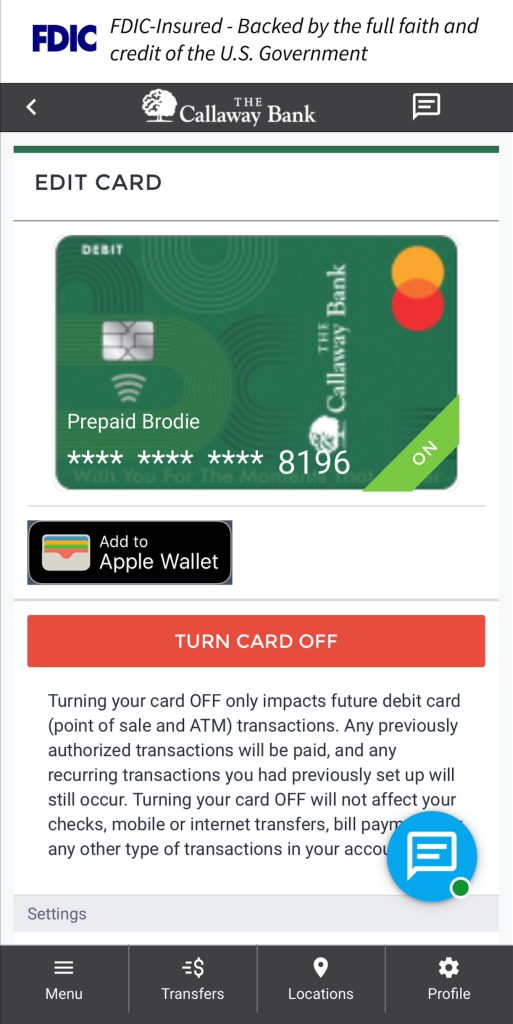
In the The Callaway Bank app, look for the “Add To” option in Digital Banking to enjoy instant Digital Wallet access for your watch and phone!

In Digital Banking > Manage Cards > Tap The Card You Want To Add!

The Callaway Bank Digital  Wallet


How To Fight Cardholder Fraud

fraud alert on computer

Have you ever wondered how your stolen information is used to commit fraud, and what you can do to help prevent it? We have some tips to help you keep your information safe.

Fraudsters have become increasingly adept at getting the information they need to commit fraud by posing as financial institution call center agents, or by sending text messages that look like they are coming from your trusted financial institution, warning of suspicious transaction activities. They are also known to call in to call centers posing as customers requesting changes to their card information and parameters. Fraudsters use information stolen through data breaches (at health insurance providers, reward program providers, credit bureaus, merchant terminals, and social media sites, to mention just a few recent ones) as well as through malware programs deployed on personal computers and other sources. Stolen personally identifiable information (PII) is combined with stolen card information, resulting in sufficient information to create profiles that fraudsters can use to position themselves as the actual cardholders.

Help protect your personal information from fraud by remembering:

A text alert from The Callaway Bank warning of suspicious activity on your card will not include a link to be clicked. You should never click on a link in a text message supposedly from The Callaway Bank. A valid notification from The Callaway Bank will provide information about the suspect transaction and ask you to reply to the text message with answers such as ‘yes’, ‘no’, ‘help’, or ‘stop,’ and will never include a link.

A text alert from The Callaway Bank will NOT be from a 10-digit number resembling a phone number. 

A phone call from The Callaway Bank’s automated dialer will only include a request for a cardholder’s zip code and no other personal information unless they confirm that a transaction is fraudulent. Only then will they be transferred to the Customer Care Team, who will ask questions to confirm their identity before proceeding with the transaction.

If at any point you are uncertain about questions being asked or the call itself, hang up and call The Callaway Bank directly at 800-446-2265 (BANK). Receive a call claiming to be The Callaway Bank call center and asking to verify transactions. You shouldn’t have to provide any information other than your zip code and a ‘yes’ or ‘no’ to the transaction provided.

The Callaway Bank will NEVER ask for the debit card PIN or the 3-digit security code on the back of your card.

Fraudsters posing as call center agents will often ask you to verify fake transactions. When you say no, you did not perform those transactions. The fraudster then says that your card will be blocked, a new card will be issued, and that they need the card’s PIN to put on the new card. Many people believe this and provide their PIN. A real call center agent will tell you to wait until you receive your new card to activate it and set a new PIN.

Regularly check your account(s) online for suspicious transactions, but especially if you are unsure about a call or text message you’ve received. If anything looks amiss, call The Callaway Bank directly for assistance.

If you receive a voice or a text message from The Callaway Bank’s fraud call center and are unsure about responding to it, call The Callaway Bank’s Customer Care Team 800-446-2265 directly for assistance.